










Configuring a Counter-Strike 1.6 server can significantly improve the quality and dynamics of multiplayer gameplay. Our game server panel allows administrators to adjust almost all server variables contained in the configuration files. Additionally, our panel includes a quick configuration tab where you can effortlessly change settings such as server name, number of slots, server password, admin password, initial cash amount, friendly fire, map, and many others without the need to edit configuration files. The capabilities that our Counter-Strike server provides will allow for the modification of nearly all important aspects that create a perfectly personalized gameplay experience. In this article, you will learn how to configure your Counter-Strike server using our flexible game server panel.
How to configure a Counter-Strike 1.6 server
Once you have stopped your server you can start changing the parameters, so go to the “Startup” tab. This is where the most important Counter-Strike server variables are located, which you can edit without having to search for configuration files. All possible parameters are listed below.
| Variable | Default Value | Description |
| Server Name | default hostname | Assign name for your server |
| Max Players | 16 | Set maximum number of players allowed on your server |
| Server Password | – | Set server password |
| RCON Password | password | Set admin password |
| Map | de_dust2 | Change map on your server |
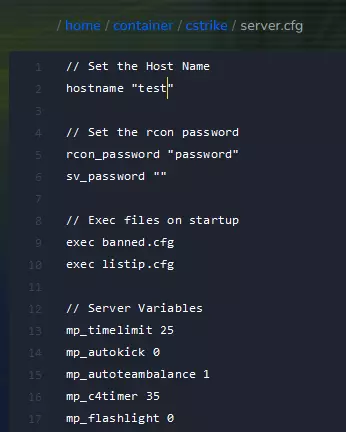
“Startup” tab contains only some of server variables – if you want to eIf changing the above parameters did not allow you to adjust the gameplay to your needs, go to the configuration file. To do this, access the server files by going to the “Files” tab and follow this path:dit variables not included in the table, follow this path:
/home/container/cstrike/server.cfg
After making all changes to the server, restart it. Go to the “Console” tab again and select “Restart”.
We hope that our intuitive web interface has allowed you to configure your Counter-Strike 1.6 server easily. If you want to ask us any questions, feel free to contact us via e-mail, ticket or live chat!
This tutorial will show you how to configure Counter Strike server

