










As a Counter-Strike: Condition Zero server administrator, you have full control over all gameplay settings. In our server panel you can install various modifications, introducing completely new functions to the game, install new maps and much more. The “Startup” tab will allow you to change basic parameters such as the server access password, number of players, administrator password, round length and amount of starting money. Read the guide below to learn how to properly configure your server and enjoy playing with other players.
How to configure a Counter-Strike: Condition Zero server
1. Stop Counter-Strike: Condition Zero server
Go to the “Console” tab in our game server panel and click on the “Stop” button. At this point you can start changing the selected parameters.
2. Change tab to “Startup”
Here you can freely change the most basic parameters of your server – they are described in the table below.
| Variable | Default Value | Description |
| Server Name | default hostname | Assign name for your server |
| Max Players | 16 | Set maximum number of players allowed on your server |
| Server Password | – | Set server password |
| RCON Password | password | Set admin password |
| Map | as_oilrig | Change map on your server |
3. Configure more complex server elements
If the changes made in the configuration tab are not enough for you, you can go ahead and change other server elements in the main configuration file. To find it, go to the “Files” tab and follow this path: /home/container/czero/server.cfg
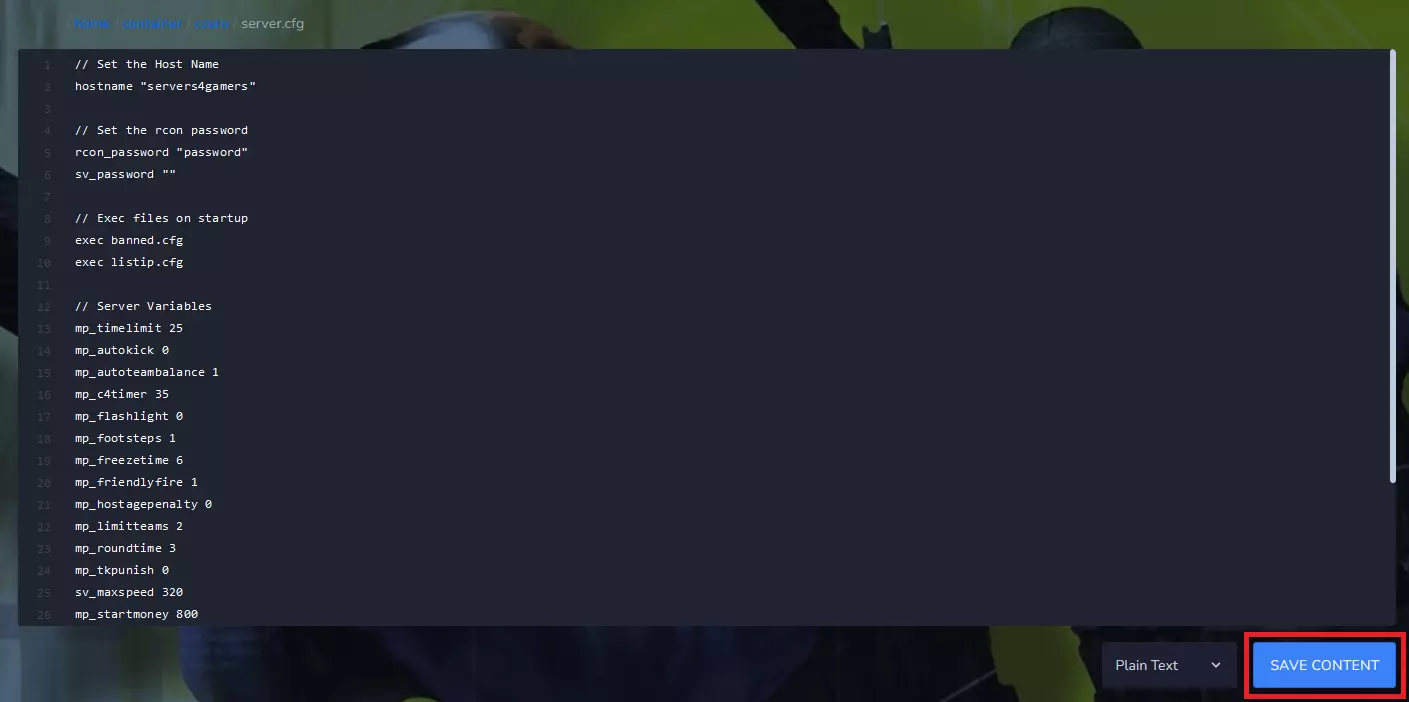
4. Start Counter-Strike: Condition Zero server
Go to the “Console” tab – here you can click on “Start” button.
Have you finished setting up? Great! Time to play. In this guide, we explained step by step how to connect to a Counter-Strike: Condition Zero server.
We hope that our intuitive web interface has allowed you to configure Counter-Strike: Condition Zero server easily. If you want to ask us any questions, feel free to contact us via e-mail, ticket or live chat!
This tutorial will show you how to configure Counter-Strike: Condition Zero server

