










Assetto Corsa is one of the most popular racing games, appreciated by both casual and professional players. One of its greatest strengths is its extensive modding support, allowing the community to create and share custom cars, tracks, and enhancements for physics and graphics. This freedom keeps Assetto Corsa fresh and exciting—there are always new challenges and unique tracks to explore. In this guide, we will explain how to install a custom track on your server using the AC Web Manager.
Install custom track via Assetto Corsa web panel
The first step is to install a custom track on your Assetto Corsa server using the web panel. If you haven’t found a suitable track yet, you can use this page: https://assettocorsa.club/mods/tracks
1. Download custom track and unzip folder.
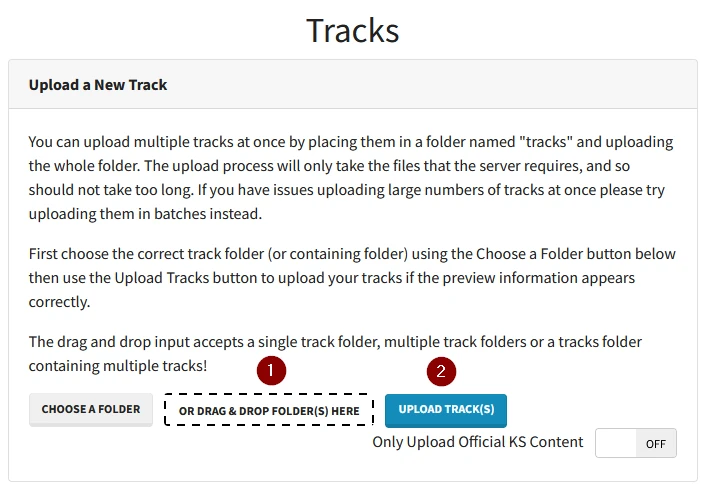
2. Access Assetto Corsa server web panel and log in.
3. Select the “Tracks” option.

4. Upload the folder with the selected custom track and click “Upload Track(s)“.
Install custom track locally
The next step will be to upload the folder to the local game files.
1. Launch Steam application and go to the library.
2. Right click on the game and select “Browse local files“.
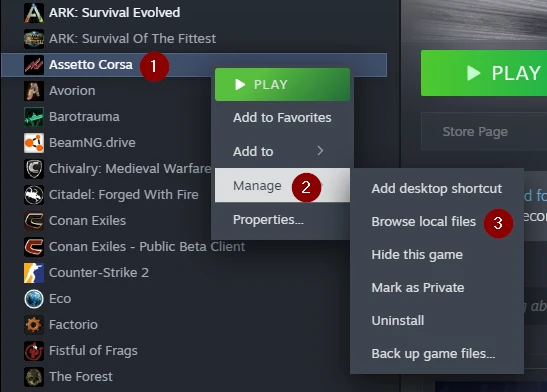
3. Follow this path:
assettocorsa/content/tracks4. Upload your track folder here.
We hope that our intuitive web interface has allowed you to configure your Assetto Corsa server easily. If you want to ask us any questions, feel free to contact us via e-mail, ticket or live chat!

