










As a DayZ server administrator, you have full control over all settings, allowing you to tailor the server to your players’ preferences. One crucial factor affecting gameplay is the time acceleration rate. In this article, we will explain how Time Acceleration and Night Time Acceleration work and how to configure them effectively.
How to set time acceleration
1. Access server files and edit serverDZ.cfg file.
2. Locate the time lapse factors and set the desired values:
serverTimeAcceleration=
serverNightTimeAcceleration=
How do multipliers work
By default, Time Acceleration is set to 12 (values range from 0 to 24). This means that time in the game passes 12 times faster than in real life (a day in the game lasts 2 hours in real time). Setting it to 1 will make time pass at the same rate as real life.
The additional parameter, Night Time Acceleration, is set to 1 by default (values range from 0.1 to 64). It allows you to speed up or slow down the passage of time during the night. When set to 1, nighttime passes at the speed determined by Time Acceleration. For example, if Time Acceleration is set to 12 and Night Time Acceleration to 2, nighttime in the game will pass 24 times faster (12 * 2).
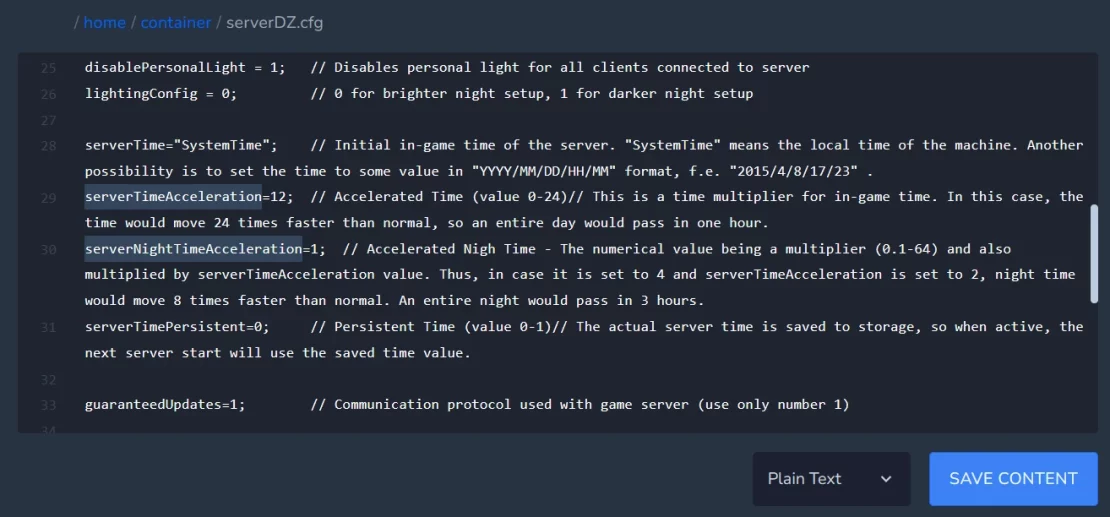
3. Save file and restart your server.
We hope that our intuitive web interface has allowed you to configure DayZ server easily. If you want to ask us any questions, feel free to contact us via e-mail, ticket or live chat!

