



To update a Minecraft server to the latest snapshot, simply install the newest snapshot version from your server’s version manager and restart the server. This allows you to test experimental Minecraft features before they’re officially released. Below, you’ll find the steps required to update your Minecraft server to the latest snapshot using our game server panel.
Steps to Update a Minecraft Server to a Snapshot
Stop Your Minecraft Server
Open your game server panel and navigate to the Console tab. Click the Stop button to safely shut down your server before installing a new Minecraft version.
Install Snapshot
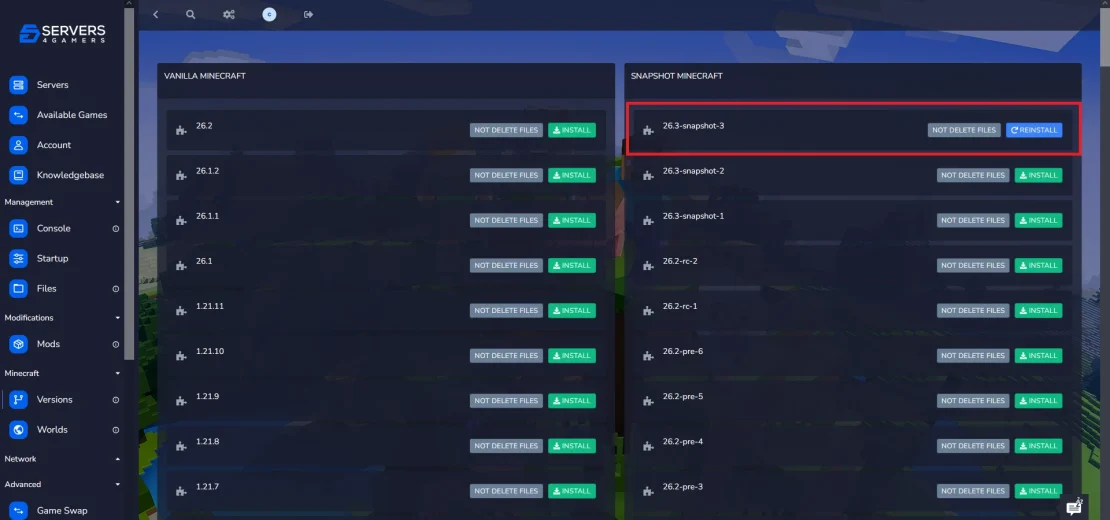
Once your server has stopped, open the Versions tab. Here you’ll find all available Minecraft versions, including the latest snapshots released by Mojang. Select the newest snapshot from the list and click Install. Wait for the installation process to complete before continuing.
Start Your Minecraft Server
Return to the Console tab and click Start. Once the server is online, you can join your world and start testing the latest experimental Minecraft features before they’re officially released.
FAQ
What Is a Minecraft Snapshot?
A Minecraft snapshot is an experimental version of the game released before a major update. It gives players early access to upcoming features, allowing them to test new blocks, items, mobs, structures, and gameplay mechanics before they’re officially added to Minecraft. Since snapshots are still in development, they may include bugs, unfinished content, or features that change before the final release. They’re a great way to explore the newest Minecraft content and experience upcoming updates before anyone else.
How to Change to a Minecraft Snapshot on Your Local PC?
To play a Minecraft snapshot on your local PC, open the Minecraft Launcher and select the snapshot installation from the version selector located next to the Play button. If you don’t already have a snapshot installation, create one from the Installations tab by choosing the latest snapshot version. Once selected, click Play to launch Minecraft using the newest experimental version.