










In this article, you will learn how to edit the serverconfig.xml file to change your map to a pre-generated one or generate a random world (RWG) using a selected seed.
1. Go to the server console and click Stop to shut it down.
2. Go to Files and select the file serverconfig.xml.
3. Find the following server variables: Game World, WorldGenSeed, WorldGenSize, and GameName.
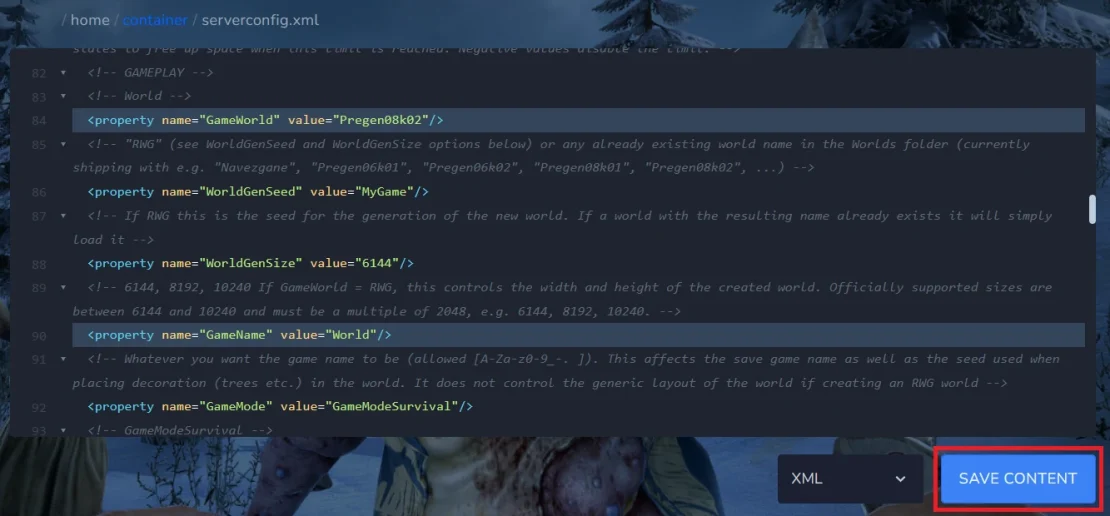
The GameWorld setting determines the name of the server world (default = Navezgane). If you want to use a pre-generated map, enter one of the following values:
- Pregen06k01
- Pregen06k02
- Pregen08k01
- Pregen08k02
If you want to generate a random world, enter RWG.
WorldGenSeed is the variable you must change if GameWorld = RWG, and this is where you enter the seed you want to use for world generation.
WorldGenSize is the variable responsible for the size of the randomly generated map; if you want to use one, enter a number that is a multiple of 2048 here.
GameName is the variable responsible for the current server save; enter a new name here to create a new save with a new map.
4. Save the file.
5. Start server.

