










Do you want to create your own race on an Assetto Corsa server but don’t feel like manually editing configuration files? Fortunately, Web Manager is a tool that allows for easy and intuitive server management – including the creation of custom races. In this guide, I will explain how to set up a custom race using Web Manager.
Create custom race
1. Access Assetto Corsa web manager and log in.
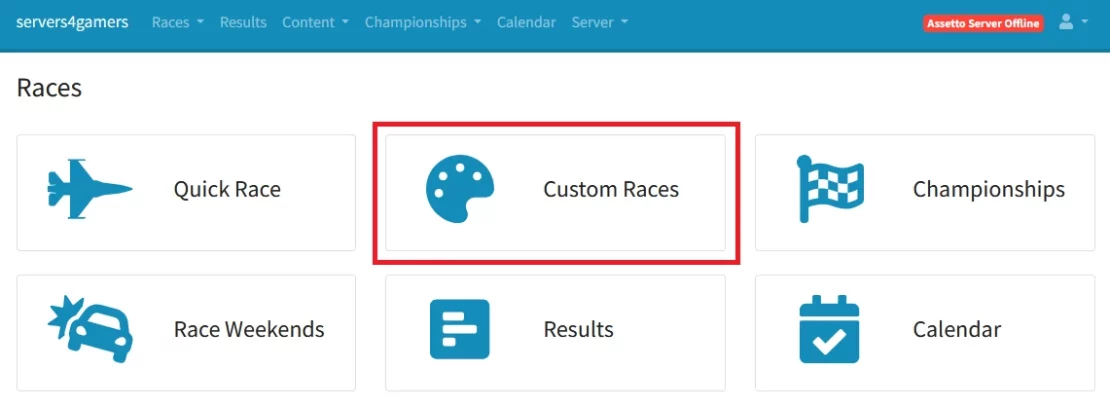
2. Go to the “Custom Races“.
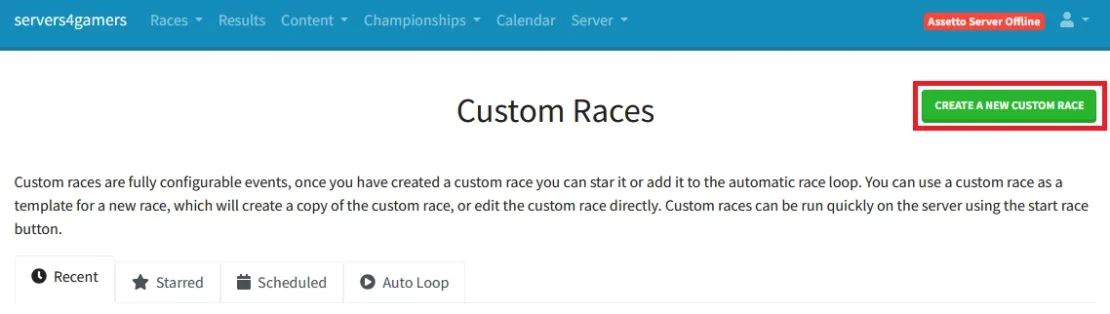
3. Click “Create a new custom race“.
4. Configure desired custom race settings:
| Track&Cars | Track&Cars allows you to select tracks and available cars. |
| Sessions | Sessions is divided into 4 parts: – Race – Qualifying – Practice – Booking |
| Entry List | Entry List allows you to set the maximum number of players and add entrant(s). |
| Assists | Assists allows you to configure additional driver assistance. |
| Weather | Weather allows you to set the weather that will occur during the race. |
| Realism | Realism adds realistic elements to the gameplay. |
| Rules | Rules sets the rules that players must follow during the race. |
| Server Options | Server Options configures several server settings |
5. Once you have finished, select “Save Custom Race” and “Start Race“.
We hope that our intuitive web interface has allowed you to configure your Assetto Corsa server easily. If you want to ask us any questions, feel free to contact us via e-mail, ticket or live chat!

