










BeamMP is a popular modification for BeamNG.drive, allowing multiplayer gameplay on dedicated servers. With it, you can compete with other players, organize races, and create realistic driving scenarios. However, to maintain server stability and compatibility with the latest version of the game, it is sometimes necessary to update BeamMP or revert to an earlier version. Changing the BeamMP server version may be required in cases of mod compatibility issues, bugs after updates, or the need to customize the gaming environment to suit player preferences. In this guide, I will explain how to change the version on a BeamMP server in a few simple steps.
How to change server version
1. Go to the control panel and select BeamMP server.
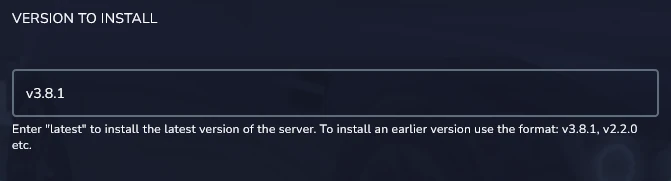
2. Go to the “Startup” tab and find “Version to Install” option.
3. Enter the version you want to install on your server. Be sure to enter the version correctly: v3.2.3, v3.4.5 etc.
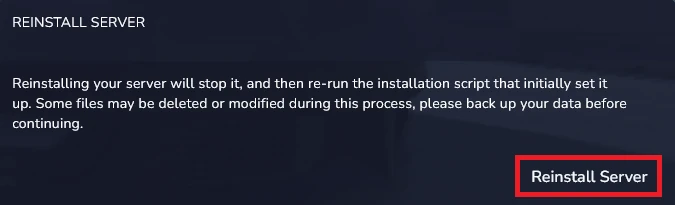
4. Go to the “Settings” and click “Reinstall Server“.
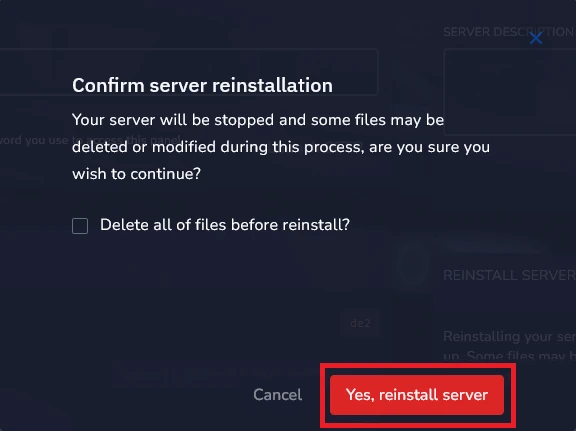
5. Click “Yes, Reinstall Server” to confirm.
We hope that our intuitive web interface has allowed you to configure your BeamMP server easily. If you want to ask us any questions, feel free to contact us via e-mail, ticket or live chat!

