










If you want to quickly start a race on your Assetto Corsa server, the best option is to use the Web Panel, which allows you to create a Quick Race. Unlike a standard session, Quick Race skips the Practice, so players go straight to Qualifying or directly to the race, depending on the settings. In this guide, I’ll show you step by step how to set up a Quick Race and start the race as fast as possible.
How to start quick race
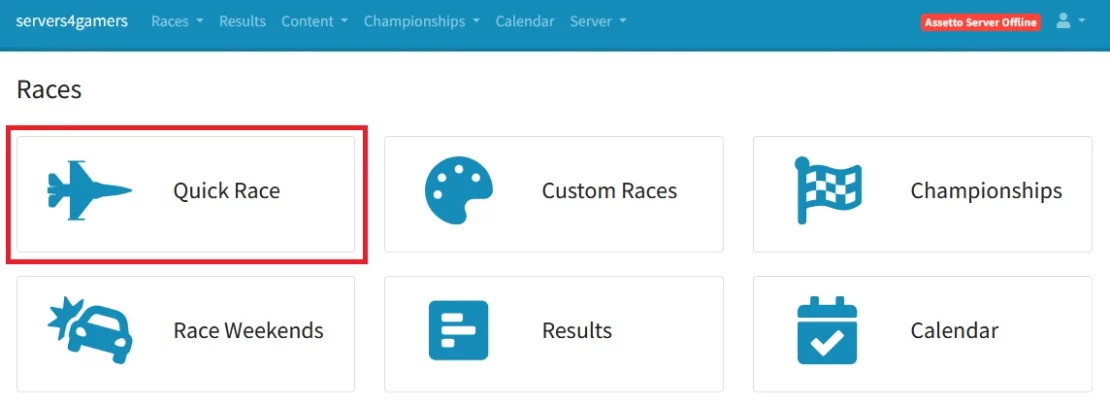
1. Access web manager, log in and select “Quick Race“.
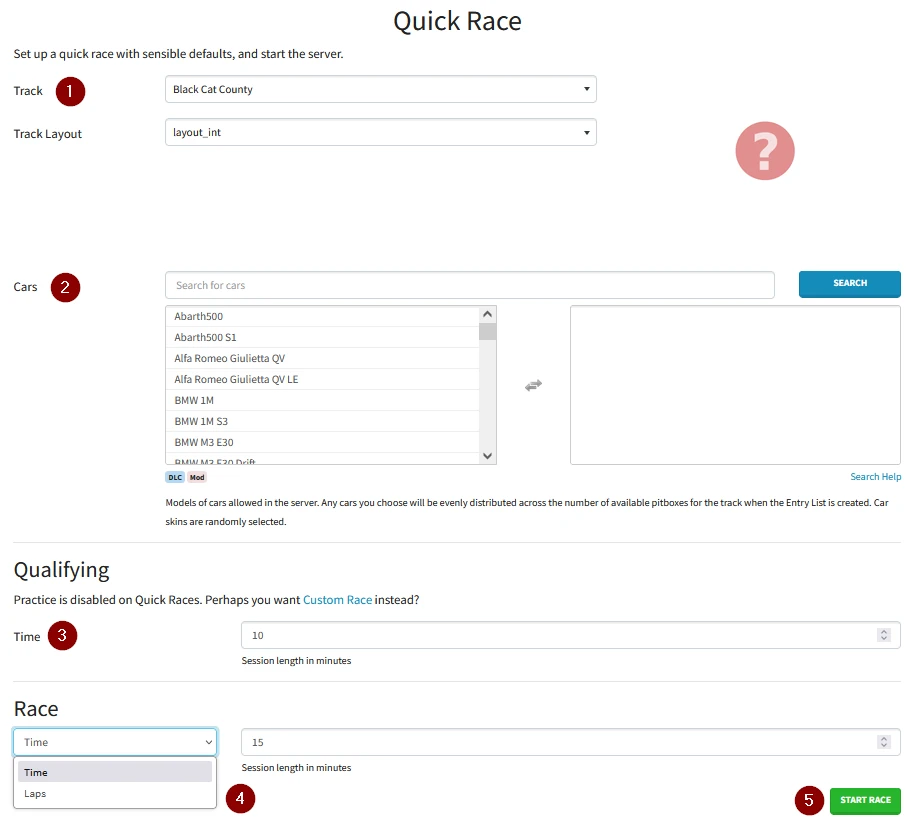
2. Go to “Track” and select a track – for some tracks there will be a “Track Layout” option available.
3. Go to “Cars” and select cars.
4. Set the number of minutes that “Qualifying” will last.
5. Go to “Race” and choose whether you want the length to be based on a specific time or laps. Once you’ve chosen, enter the specific number of minutes/laps.
6. Click “Start Race“.
We hope that our intuitive web interface has allowed you to configure your Assetto Corsa server easily. If you want to ask us any questions, feel free to contact us via e-mail, ticket or live chat!

