










Are you ready to take your American Truck Simulator (ATS) experience to the next level? Configuring your own server can enhance multiplayer gameplay, allowing you to drive alongside friends or host a trucking community. Follow this detailed guide to set up your American Truck Simulator server efficiently. Configuration adapts server to individual needs of the owner and players. A person with access to server files can change almost all parameters, such as maximum number of players, password and many others.
If you want to configure your American Truck Simulator server follow this guide:
1. Stop American Truck Simulator server
Navigate “Console” tab in your server panel. Here you can find “Stop” button which can stop your server after click on it.
2. Navigate “Startup” tab to start basic configuration
This tab contains the most important parameters of your server – you can change them without editing the configuration file. The table below shows all variables you can change in “Startup” tab.
| Variable | Default Value | Description |
| Auto-Update Server | ON | If enabled, the server will update after each restart |
| Server Name | default value | American Truck Simulator server name |
| Max Players | 8 | Maximum number of slots |
| Server Password | – | If set, players will be required to enter this password to join the convoy |
| Steam Auth Token | – | Authorization token used for integration with Steam services |
3. Perform advanced configuration
If you are not satisfied with the server configuration performed in the “Startup” tab, you can feel free to continue it in the main configuration file. To do this, you need to go to your server’s files in the “Files” tab and find the file named:
server_config.siiyou will find its location by following this path:
/home/container/.local/share/American Truck Simulator/server_config.sii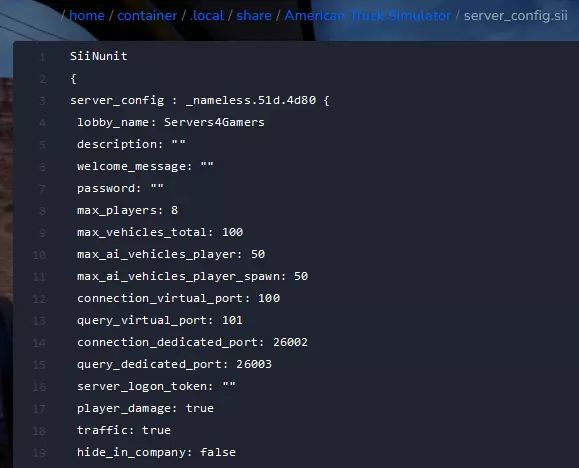
4. Restart your server
After all changes you need to restart your server to approve all changes. Come back to the “Console” tab and click on “Restart” button to quickly restart your server.
We hope that our intuitive web interface has allowed you to manage your ATS server easily. If you want to ask us any questions, feel free to contact us via e-mail, ticket or live chat!
This tutorial will show you how to configure American Truck Simulator server

