










Effective server management in Avorion requires granting at least one person administrator privileges. This role provides access to essential functions such as player management, server settings adjustments, and rule enforcement. In this guide, I will explain how to add or remove administrators on an Avorion server using our game server panel.
How to add an admin via Startup
1. Go to the game server panel and select “Startup“.
2. Find the “ADMIN ID” option and enter the Steam ID of the person you want to give administrator privileges.
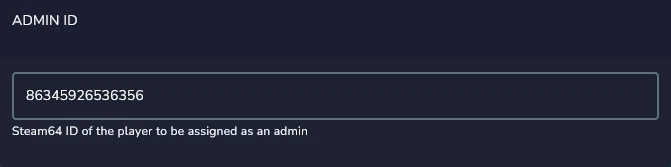
3. Restart Avorion server.
Adding a new admin using this method will save their SteamID in the admin.xml file. If you add another ID and restart the server, the previous entries will remain on the list. To remove unwanted IDs, you need to edit the file manually.
How to add an admin via admin.xml file
1. Access server files and edit admin.xml file.
/home/container/galaxy/world/admin.xml2. Go to the end of file and find:
<admin name="admin" id="SteamID"/>3.Replace “Steam ID” with your own ID. You can add more administrators by adding new lines as in the example below.
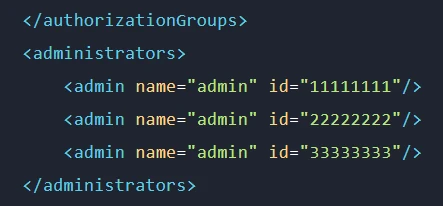
4. Restart Avorion server.
How to delete admins
1. Edit admin.xml file and find:
<admin name="admin" id="SteamID"/>2. Delete the lines from the IDs of the administrators you want to remove.
3. Restart server.
After restarting the server, only one line will appear, with the Steam ID entered in Startup.
We hope that our intuitive web interface has allowed you to configure your Avorion server easily. If you want to ask us any questions, feel free to contact us via e-mail, ticket or live chat!

