










Joining a Rust server is the first step if you want to start playing multiplayer and compete with other players. In this guide, we’ll show you how to connect to a Rust server using both the in-game server list and a direct IP connection. We’ll also explain how to fix the most common connection issues, so you can quickly and easily start playing.
How to join a Rust server with IP
1. Launch Rust.
2. Once you are in the main menu, press F1 to open the in-game console.
3. Type connect IP:PORT and press Enter.
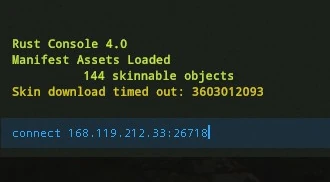
If you don’t know your server address, log in to our control panel and go to the Console or Network tab.
How to join a Rust server via server browser
1. Launch Rust.
2. Once you are in the main menu, click PLAY.
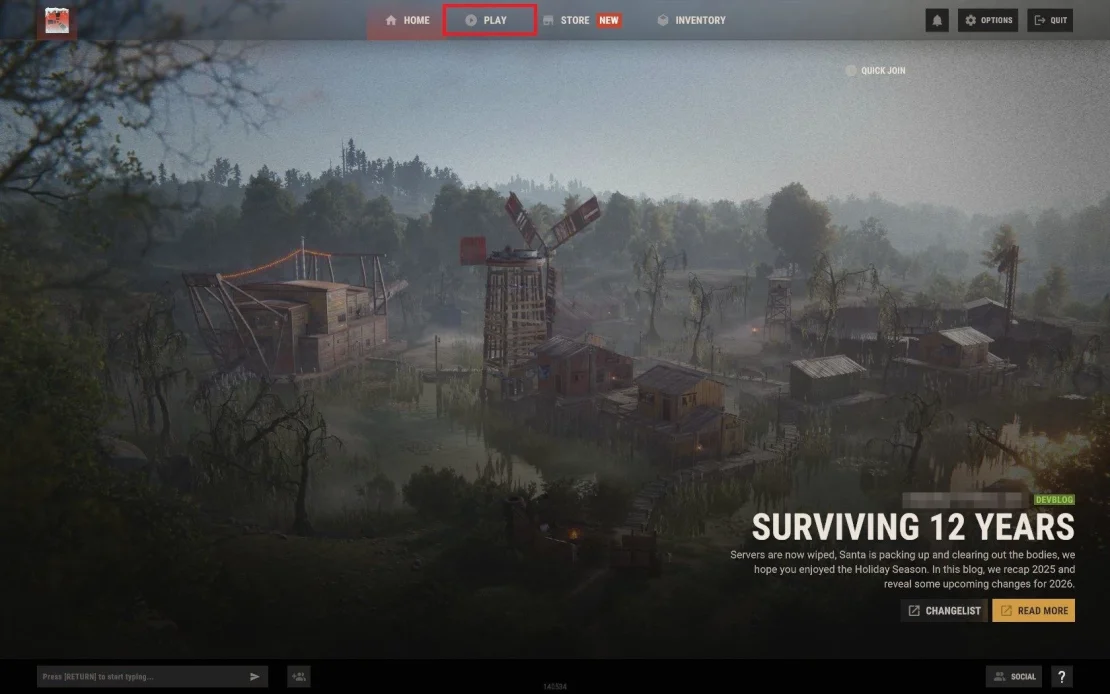
3. Go to the Community tab.

4. In the top-right corner, enter your server name.

5. After clicking on your server entry, an additional window will appear – click Connect to Server.

Common Connection Issues
Here are some of the most common issues:
Server not visible in the list
Sometimes the server is running but does not appear in the server list. This can happen if the server was started recently or if filters are enabled that prevent it from being displayed.
Fix: we recommend connecting directly using the server IP address or adding the server to the Steam Favorites list (in some cases, you may need to use PORT + 1).
EAC: Anti-Cheat client protection not active
This issue is usually caused by corrupted Easy Anti-Cheat (EAC) files on the client side.
Fix: try verifying the game files in Steam, run Steam as an administrator, and make sure EAC is not being blocked by your firewall or antivirus software.
Connection Attempt Failed
If the connection fails while loading the map, the issue may be caused by an unstable or slow internet connection or a very high ping.
Fix: check your internet connection, close background downloads, and try connecting again after a few minutes.
We hope that our intuitive web interface has allowed you to connect your Rust server easily. If you want to ask us any questions, feel free to contact us via e-mail, ticket or live chat!
This tutorial will show you how to connect Rust server

