










Avorion is a sandbox game where players can explore space, build ships, and manage their own empire. One of the game’s biggest advantages is its support for mods, allowing players to customize gameplay to their preferences. The Steam Workshop offers hundreds of modifications, ranging from new ships and weapons to advanced changes in game mechanics. In this guide, I will explain how to install Workshop mods on an Avorion server.
Install mods via Steam Workshop installer
1. Go to the control panel and select “Workshop“. Find the modifications you want to install.
2. Click “Install” to install the mod.

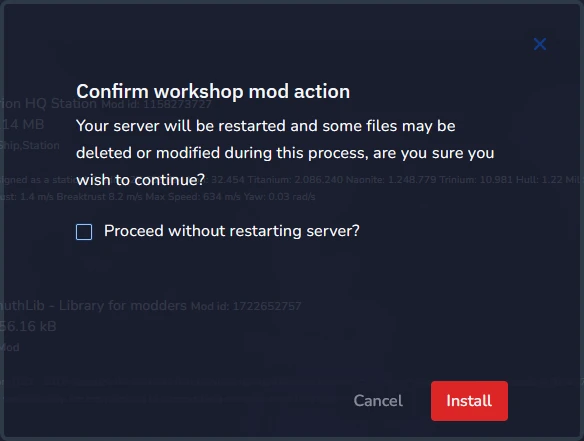
3. Select “Install” again to confirm changes. If you want to install more than 1 mod, select “Proceed without restarting server” – in this case, restarting after installing the last one will be enough.
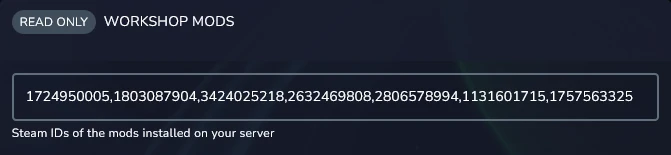
If you would like to check the list of currently installed mods, check the “Workshop Mods” option in “Startup“.
Uninstall mods via Steam Workshop installer
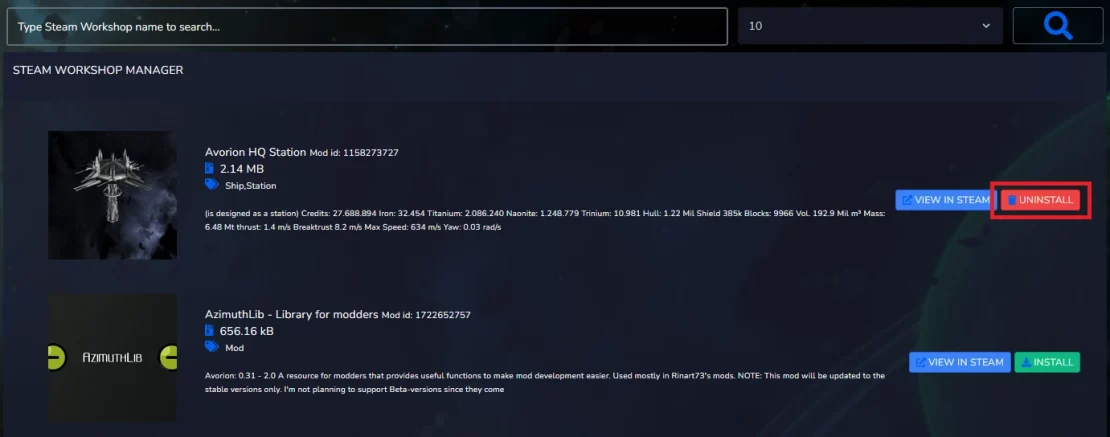
1. Go to the control panel and select “Workshop“. Find the modifications you want to uninstall.
2. Click “Uninstall” to uninstall the mod.
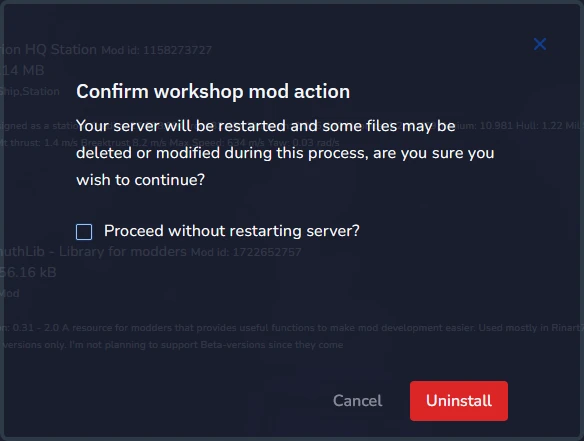
3. Select “Uninstall” again to confirm changes. If you want to uninstall more than 1 mod, select “Proceed without restarting server” – in this case, restarting after uninstalling the last one will be enough.
We hope that our intuitive web interface has allowed you to configure your Avorion server easily. If you want to ask us any questions, feel free to contact us via e-mail, ticket or live chat!

